Chat Prompt Template & Chat Prompt-2
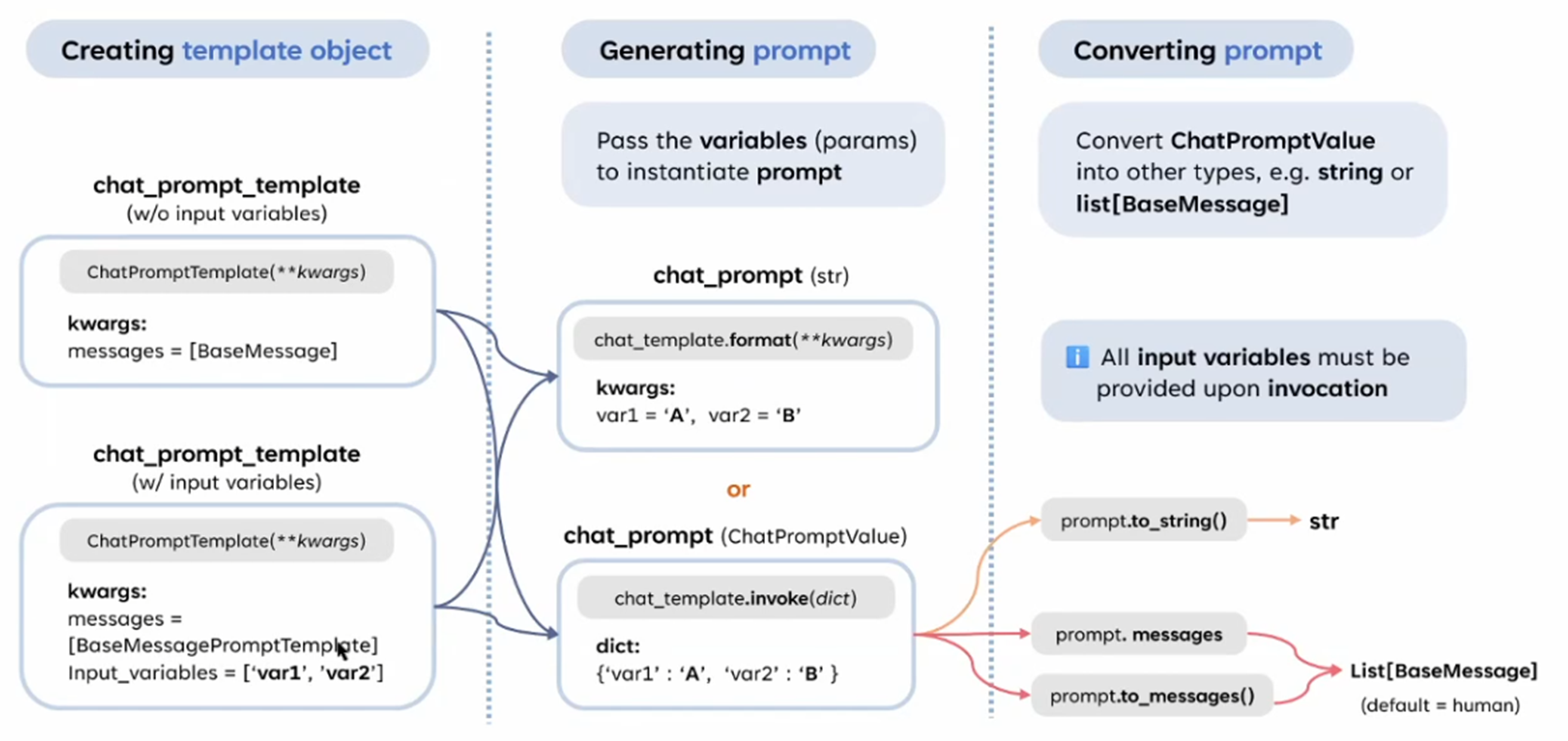
這張圖的左邊部分與之前的圖相比,增加了 Chat Prompt Template 的創建方式的細化,特別是是否需要指定輸入變數 (input variables)。以下是對左側部分的詳細解釋,以及圖中想表達的差異:
1. ChatPromptTemplate 的兩種創建方式
這張圖的左側部分將 ChatPromptTemplate 的創建方式進一步區分為 不帶輸入變數 和 帶輸入變數 兩種情況:
1.1 ChatPromptTemplate (w/o input variables)
-
情況:
- 不需要指定輸入變數,直接傳入消息列表 (
BaseMessage) 即可。 - 適用於靜態的、多輪對話上下文,內容不需要動態填充。
- 不需要指定輸入變數,直接傳入消息列表 (
-
參數:
messages:消息列表,內容為BaseMessage類型(例如HumanMessage,AIMessage, 或SystemMessage)。
-
範例:
from langchain.prompts import ChatPromptTemplate
from langchain.schema import HumanMessage, SystemMessage

chat_prompt_template = ChatPromptTemplate(
    messages=[
        SystemMessage(content="You are a helpful assistant."),
        HumanMessage(content="Tell me a joke."),
        HumanMessage(content="What is the capital of France?")
    ]
) -
特點:
- 不需要動態變數插值,適合固定的對話腳本。
- 模板直接是靜態消息,不依賴於外部參數。
1.2 ChatPromptTemplate (w/ input variables)
-
情況:
- 需要指定輸入變數,並在生成 Prompt 時插入動態內容。
- 適用於需要填充變數(例如
{var1})的情境。
-
參數:
messages:消息列表,內容為BaseMessagePromptTemplate(例如HumanMessagePromptTemplate,SystemMessagePromptTemplate)。input_variables:變數名稱列表,例如['var1', 'var2']。
-
範例:
from langchain.prompts import ChatPromptTemplate
from langchain.prompts.base import HumanMessagePromptTemplate, SystemMessagePromptTemplate

chat_prompt_template = ChatPromptTemplate(
    messages=[
        SystemMessagePromptTemplate.from_template("You are a helpful assistant."),
        HumanMessagePromptTemplate.from_template("Tell me a joke about {topic}."),
        HumanMessagePromptTemplate.from_template("What is the capital of {country}?")
    ],
    input_variables=["topic", "country"]
) -
特點:
- 模板中包含變數占位符(例如
{topic}),並且需要在生成 Prompt 時提供這些變數的值。 - 適合動態生成對話內容的場景。
- 模板中包含變數占位符(例如
2. 生成 Prompt 的一致性
不論模板是否包含輸入變數,在生成 Prompt 的時候,兩者的調用方式是一致的,分為:
- .format():
- 適合直接生成字符串的情境。
- .invoke():
- 適合需要更結構化輸出的場景(返回
ChatPromptValue)。
- 適合需要更結構化輸出的場景(返回
3. 將 Prompt 轉換為其他格式
右側部分說明了如何將生成的 Prompt 轉換為其他格式,這部分與之前的圖一致,包括:
- .to_string():轉換為純字符串。
- .messages:獲取
list[BaseMessage]。 - .to_messages():類似
.messages,但更靈活。
4. 主要差異點
這張圖的核心是在左側部分:
- 增加了對 ChatPromptTemplate 的兩種創建方式(是否指定輸入變數)的細分。
- 不帶輸入變數的模板 適用於靜態對話腳本。
- 帶輸入變數的模板 適用於動態插值的場景。
5. 使用場景比較
| 創建方式 | 適用場景 |
|---|---|
| 不帶輸入變數 | 固定對話腳本,例如 FAQ 回答、靜態系統設置。 |
| 帶輸入變數 | 動態內容生成,例如基於用戶輸入或上下文填充的個性化回覆。 |